AI Search and GA4: Rethinking Website Visibility and Success Metrics


Introduction
As we recently discussed in AI Search and Your Website: How to Stay Visible in the Age of Overviews, Generative Search represents the biggest transformation in online search since search engines were created. Driven by advanced Artificial Intelligence models (such as Google Gemini), Generative Search shifts the focus from a simple list of links, to delivering direct, consolidated, and conversational answers. A year ago we were using search engines, and now we use answer engines.
To offer relevant insights to our customers in GA4, the possibilities fall into two broad areas:
- Traffic measurement and segmentation
Rethinking success metrics.
Traffic measurement and segmentation AI
Isolate and quantify the impact of AI sources
With this configuration, we will be seeing users who entered the websites by clicking on a link within the AI platform. We will not be seeing how many times the AI used the website as a source for a query to generate a response.
Technical Reason: When Google’s Search Generative Experience (SGE) uses artificial intelligence to query your site and generate an AI Overview, this process occurs on Google’s servers. The GA4 or GTM tracking code isn’t triggered, since the page isn’t actually loaded in the user’s browser in the traditional way that registers a visit.
However, the good news is that Google provides the best indication of your content’s visibility in Search (including AI Overviews) through Google Search Console (GSC). GSC becomes an essential tool for analysing AI performance, as it measures site visibility before the click, that is, directly on the Search Results Page (SERP).
The main metrics we see in GSC are:
- Impressions: The number of times the content (or a link to it) appeared on the SERP, including when it was used or cited in the AI Overview.
- Clicks: The number of actual visits to the website.
- Click-Through Rate (CTR): The ratio between Clicks and Impressions.
If Impressions remain stable but Clicks decline, it suggests that your content is still being surfaced just as often, but users no longer need to visit your site to get answers. This is a clear sign that AI-generated summaries are satisfying the query directly on the results page.
A sharp drop in CTR, particularly for informational or how-to queries, strengthens this diagnosis. It reflects not just fewer clicks but a shift in user behaviour as Search’s AI increasingly provides complete on-page answers.
1. Identify AI sources
Clarify what you want to capture by preparing a list of current and potential AI-related sources. Keep this list updated as new AI tools emerge.
- chat.openai.com
- gemini.google.com
- claude.ai
- hcopilot.microsoft.com
- www.perplexity.ai
- you.com
- huggingface.co
- pi.ai
2. Create a pattern
From the list of AI-related sources, create a Regular Expression ('regex').
For example:
(openai\.com|gemini\.google\.com|claude\.ai|copilot\.microsoft\.com|perplexity\.ai|you\.com|huggingface\.co|pi\.ai)
This pattern can be used to capture any referral traffic from these sources within GA4.
3. Navigate to custom channel groups in GA4
- Go to Admin in GA4.
- Under Data display, select Channel groups.
- Click Create new channel group.
4. Create the AI traffic channel
- Click Add new channel.
- Name it something like: AI Tools / AI Referrals
- Under Condition type, choose: Source matches regex
- Paste your regex pattern.
- Save the condition.
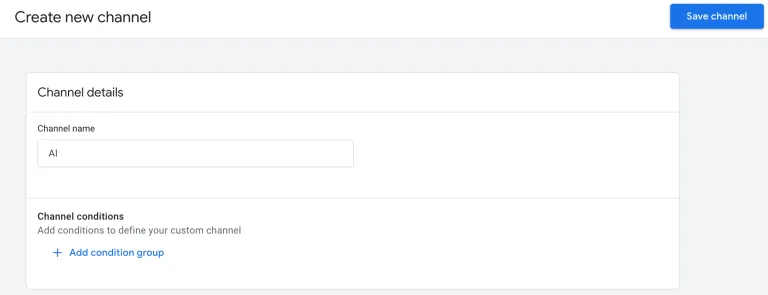
Save and publish the new channel group.
5. Wait for data population
You will need to wait for 24–48 hours for new data to populate under this group. You can then validate that traffic from, for example, ChatGPT is being classified correctly, using one of the following methods:
- Look under Reports, select Traffic acquisition and then Session default channel group
- Verify in Explore, Free form using dimensions source and session default channel group
How to use GSC together with GA4
Shift the focus to Authority. Analyse pages with high Impressions and low CTR in GSC, these are the pages the AI is consulting and referencing to summarise an answer to a search.
Pages with a low CTR in GSC but a high Engagement Rate in GA4 indicate that when the user finally clicks (after the AI Overview), they already have a much stronger intent to engage more deeply with your website; whether that’s a purchase, donation or deeper dive into the services you provide. Your traffic certainly decreases, but the quality of that traffic increases because visitors are more certain your content answers their question. Where traffic used to be fleeting as users tried to work out whether you have what they were looking for, now they are more engaged because AI has already told them your site has the answers.
Therefore, when responding about AI queries: you do not see them in real time in GA4, but you infer them through GSC analysis, which becomes the key indicator of visibility and authority in the era of Artificial Intelligence.
Rethinking success metrics
AI Mode, by increasing zero-click behaviour, forces a reassessment of what search success means.
Tracking successful visits becomes much more important than tracking raw visitor numbers, so identifying and tracking your KPIs becomes much more important. If you are focused on visitor numbers as a KPI you need to evaluate this in light of AI traffic. Much better KPIs could include:
- Product purchases
- Event sign-ups
- Donations
- Lead form submissions
Tracking these KPIs become a key focus to determine whether users achieve what they came to your website to achieve.
Improving these KPIs remains the same as it always was:
- Apply SEO/GEO best practices to ensure your site answers questions that might be asked.
- Undertake user research to ensure the reduced number of people visiting your website enjoy a frictionless journey to their destination.
In GA4, we can configure key events that demonstrate service delivery.
Key events are the most important interactions on your website or app that reflect meaningful user engagement or business outcomes. These are the events you mark as “key” so Google Analytics can highlight them in reports and use them for metrics like conversions and performance analysis.
Some of the key events we configure for our clients (many of whom are public sector organisations in the UK) include, for example:
- Completing and submitting a feedback or complaints form.
- Booking an appointment or examination.
- Downloading public notices, guides, or legislation.
- Watching an instructional video in full.
Using the website’s internal search tools (indicating the user did not find what they needed via AI and came to the site, showing high intent).
The greatest achievement in the AI era is having your website cited by Artificial Intelligence. This represents Brand Visibility, the new top of the funnel.
AI Mode transforms Google from a traffic channel into a channel for distributing critical information. Success is no longer about getting the click, but about being the official source the AI relies on to inform users and, as a result, drive high quality engagement and service interaction on the website.

About the author
Leticia Freire is a key part of Zoocha’s Digital Analytics team, bringing clarity, curiosity, and expertise to every project she touches. As a Digital Analytics Specialist, she helps teams and clients understand their data, turning numbers into meaningful insights and guiding smarter decisions across a wide range of websites and digital services. Known for her thoughtful approach and attention to detail, Leticia supports projects end-to-end, ensuring tracking is reliable, insights are actionable, and teams feel confident in the story their data is telling.
How can we help?
-
Strengthening Drupal Security: Zoocha’s Contribution to a CVE-Linked OpenID Connect Issue
Zoocha's Kimberley Massey…
-
The Digital-First Brand: Why Starting with Screens Changes Everything
Building brands that actu…
-
The Case for LocalGov Drupal: Shared Innovation, Reduced Costs, Better Outcomes
Born out of a collective …
-
What ISO Certifications Tell You About an Agency (and Why It Matters)
Want to separate marketin…


